
A tour of the UI
Local Review’s layout follows GitHub’s pull-request page closely, so it should feel familiar: a sidebar of PRs, and for each PR a header and Conversation, Files changed and Stack tabs. Under a header that is deliberately not GitHub’s.
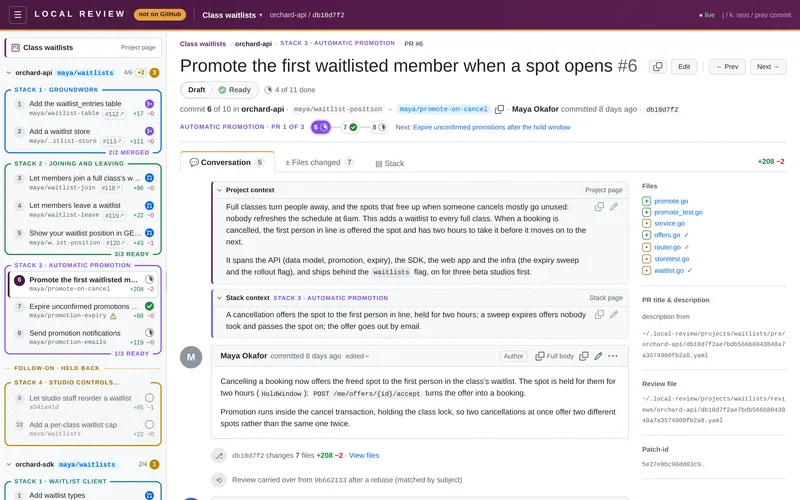
The header: deliberately not GitHub
Section titled “The header: deliberately not GitHub”The top bar is deep plum (#4a1942) with an amber underline. It carries a letter-spaced LOCAL REVIEW wordmark
and an amber “not on GitHub” pill, and selected tabs get an amber top edge. You can’t mistake it for github.com,
which matters when the rest of the page looks just like a PR you could merge.
On the right: ● live (or ○ offline while it reconnects to the server) and a reminder of the keyboard shortcuts
the page you’re on has (Keyboard shortcuts): / on the root page, j / k on a PR
page, and n / p too on its Files changed tab. The project and stack pages have none, so they show no reminder. On a project, stack or PR page, the header’s ☰ button
shows or hides the sidebar.
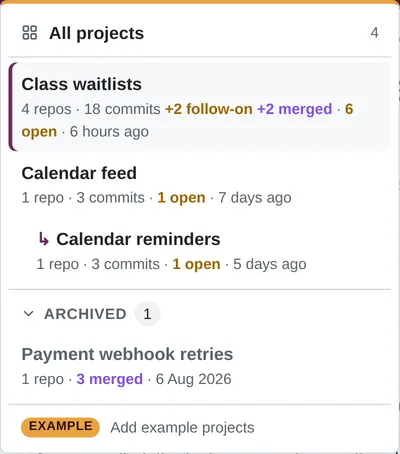
The LOCAL REVIEW wordmark goes to the root page, every project at once. Next to it is the
project you’re in, with a project switcher: its first item, All projects, is the root page too, then the
projects themselves, most recently active first, a linked project indented (↳) under
the one it builds on. Archived projects (everything landed) are in
a collapsed Archived section at the bottom of the switcher, and under that Add example projects (or Remove
example projects while they’re there). Click the project title to go to the
project page.
The root page
Section titled “The root page”/ lists every project as a card, most recently active first. A project is one piece of work: its repos, their
commit ranges, and the PR stacks they split into (Projects & repos).
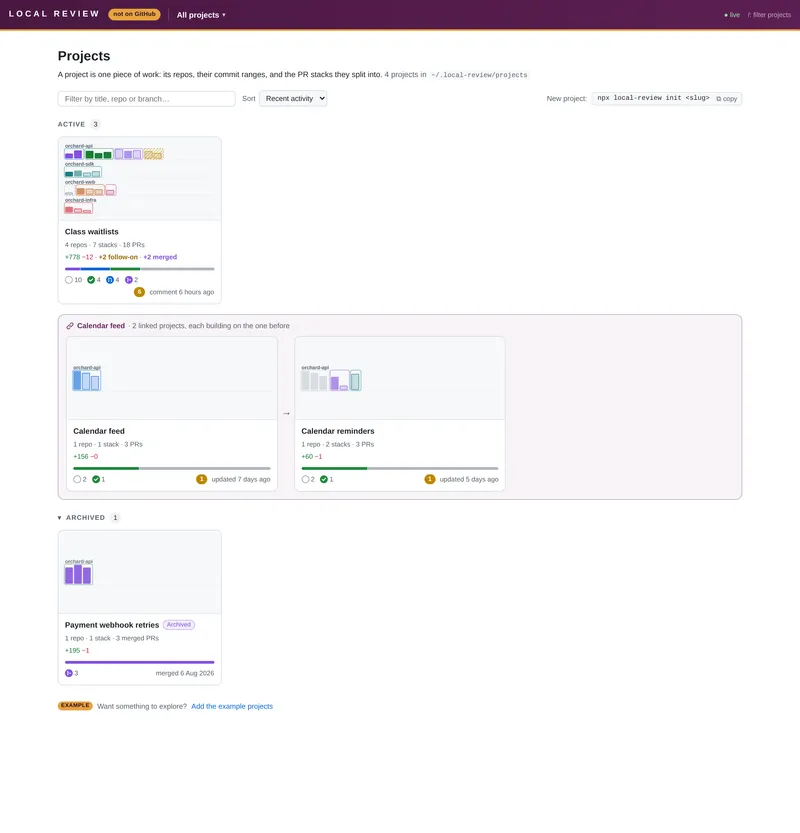
- The thumbnail is the project’s shape, the same size however big it is: a lane per repo (the first three, then
+N more repos), a box per stack in its colour, left to right, and a bar per PR. Every bar is the same width, so a 1-PR repo is visibly short beside an 11-PR one; its height is the PR’s lines changed (on a log scale, so one huge PR doesn’t flatten the rest). Its fill is the PR’s readiness: faint and outlined while a draft, stronger once ready, solid once published, purple once merged. Follow-on stacks are hatched yellow. - Below it: the title (with Example or Archived on those),
repos · stacks · PRs, the +/− lines with follow-on and merged PRs beside them (Totals), a bar of the PRs by readiness (merged, published, ready, draft), the same as readiness badges with counts, the open threads, and the last activity: the newest comment, commit, merge or edit to any of the project’s files (a Viewed mark, a title, an agent’s YAML). - Linked projects (
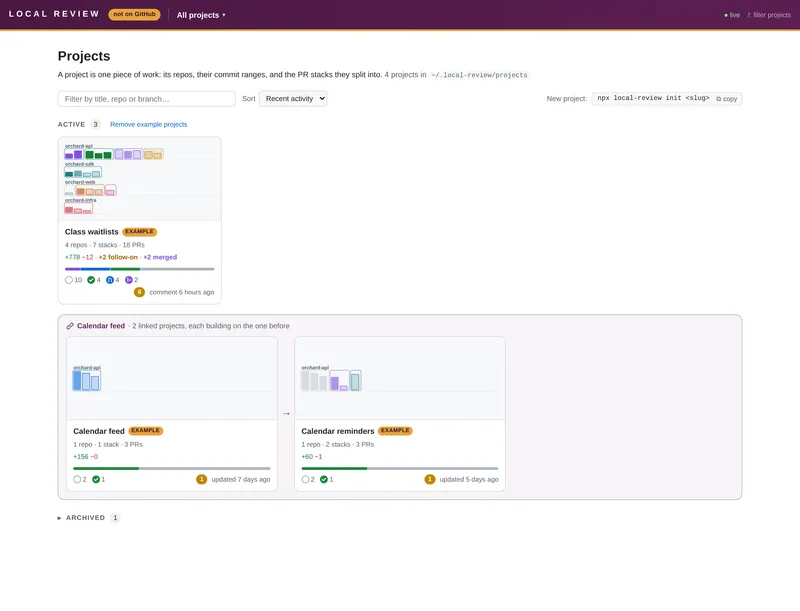
after:) share one box spanning the row: “first title · N linked projects, each building on the one before”, then their cards in order, with arrows between them. The successor’s thumbnail starts with the predecessor’s stacks in grey. - Sections: Active; Examples, once you have projects of your own besides the example projects, with Remove example projects beside the heading (on the Active heading if the examples are all you have); and Archived, collapsed (it opens by itself while the filter matches an archived project). At the bottom: Add the example projects (or Bring back the example projects after you removed them), and Add the new example project when an update ships one you don’t have.
- Filter (press
/; Esc clears it) matches the title, slug, repo names and branch names; Sort by recent activity, title, size or open threads (remembered). Thenpx local-review init <slug>line starts a new project. - Hidden projects (
hidden: trueinproject.yaml) aren’t on the root page or in the switcher (except while you’re on one), or in their counts; a chain closes over one. Their URLs still open them. If every project is hidden, the root page says so. - With no projects yet,
/is the first-run welcome page instead, with the example projects one click away.
The sidebar
Section titled “The sidebar”- The project page link at the top: the project’s title, plum while you’re on the project page. A linked project has Builds on … and Next … → links under it.
- An example project has an Example strip above that (“Made-up data to explore.”), with Remove examples.
- One collapsible section per repo, headed
repo · branch, with how many commits are fully viewed and how many threads are open. A repo with nothing live shows a purplemergedpill instead of its branch. - Each PR stack is a box with a coloured border and its title on the top line
(
STACK 1 · GROUNDWORK). Click the title to open the stack page; the stack you’re on has its title filled in its colour. Unstacked commits are grey and dashed. Follow-on stacks come last, yellow, under aFOLLOW-ON · HELD BACKdivider. - Each PR row has its number (“PR 2”; numbered 1..n across the repo, oldest first), its title, its
branch (middle-truncated; the short sha if none; a warning icon if the recorded branch moved,
struck through if it’s missing), a
#1234 ↗badge once the GitHub PR exists, +/− counts on the right, and one readiness badge, whose tooltip has the details. - A stack’s bottom border counts its ready PRs once there are any (
2/4 READY), and says4/4 MERGEDin purple once they’ve all merged. - A small amber dot after a PR’s title, a stack’s title or the project’s marks an unsaved draft there, kept in this browser.
- Problems: a missing repo or branch shows an error card, a stack problem a warning.
Drag the sidebar’s right edge to make it wider or narrower: a small grip halfway down marks it, and it turns blue while you hover or drag. It goes from 200px to half the window (600px at most); double-click the edge for the default (300px), or Tab to it and use ← / → (Keyboard shortcuts). The width is kept in the browser, one for every project and page. Branch names truncate in the middle to fit whatever it is.
The PR header
Section titled “The PR header”- Breadcrumbs above it:
Project › repo · STACK 2 · TITLE › PR #3. The project and the stack are links to their pages. In a linked project they start with the project it builds on:Calendar feed → Calendar reminders › ….

- The PR title with its position in the repo (
#3), and Edit beside it (see Editing PR titles & descriptions). On the right, ← Prev and Next → step through the repo’s PRs (or pressk/j). - Where GitHub shows Open / Draft, a Draft | Ready toggle; or a blue Published pill with the
#1234 ↗link once a GitHub PR is recorded; or a purple Merged pill once it has landed, with “merged <when> (method)” in the line below. - The review progress (
6 of 15 done, with details in its tooltip). - “commit 3 of 10 in <repo>”, and a stepper of the PRs in this stack, in its colour
(
GROUNDWORK · PR 3 of 4), each with its readiness badge. The stack’s name there opens its stack page.
Toggling readiness, an agent’s edits to the prs file, and new Viewed marks or resolved threads update the sidebar, header and stepper live.
The tabs
Section titled “The tabs”- Conversation: the Project context and Stack context boxes, the PR description, and the general and inline threads. At the bottom, the path of the review file it’s reading.
- Files changed: the diff, with a file tree, Split/Unified, and Viewed checkboxes. See Reviewing & comments.
- Stack: a picture of the project’s stacks with this PR highlighted. See Stack pictures.
The project page
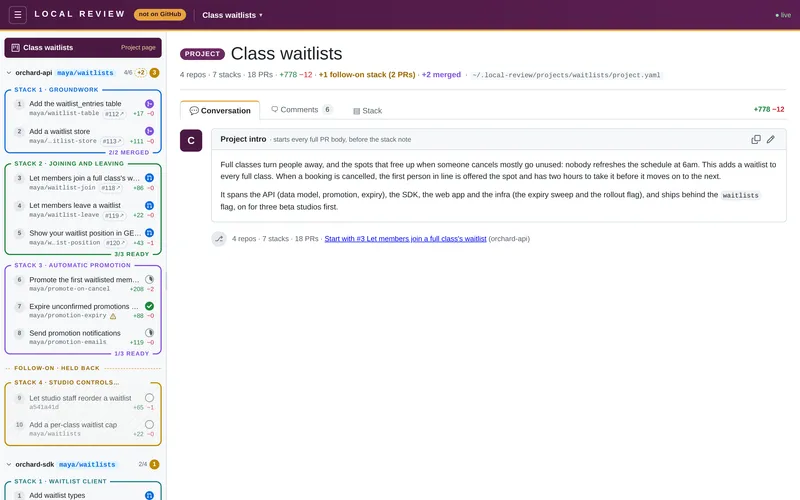
Section titled “The project page”/<project> (the link at the top of the sidebar, the first breadcrumb, or the project title in the header) is laid out
like a PR page: a plum PROJECT label and the title, a line with the project’s totals (follow-on stacks and merged PRs
left out and mentioned, as in the picture) and where its project.yaml is, then three tabs:
- Conversation: the project intro, as the first comment box, with Copy and Edit (the same editor, image attachment and “changed elsewhere” notice as a PR description). Below it, Start with #1 …, a link to the first PR to review.
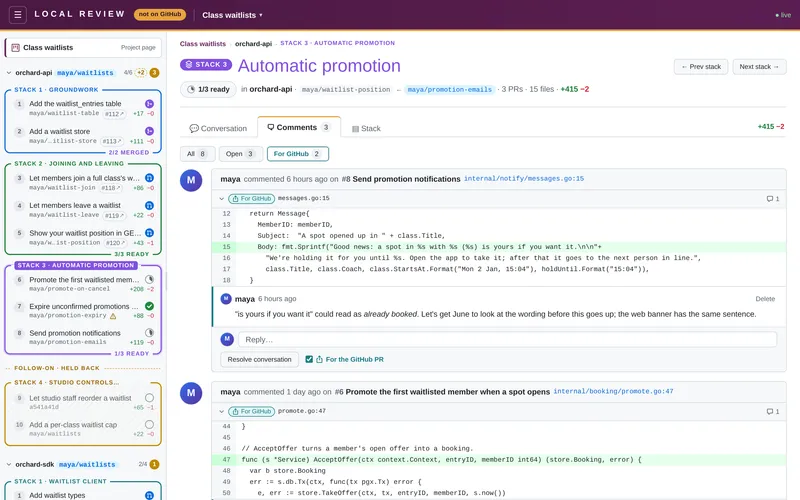
- Comments: every comment thread on every PR of the project, in all its repos and stacks, published or not. Its counter is the number of open threads. See The Comments tab.
- Stack: the stack picture for the whole project, nothing highlighted, with Show title, Copy image, Download PNG and SVG (and, in a linked project, Show predecessor).
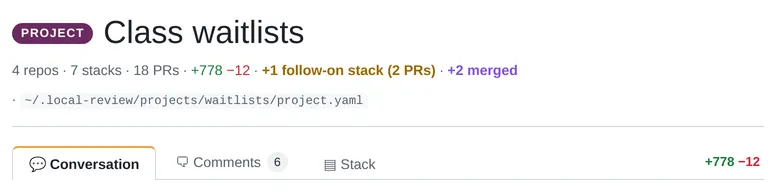
It doesn’t list the repos, stacks and PRs: the sidebar does that, and each stack’s title there opens its stack page. A linked project has a bar above the title: ”← Builds on …” (with that project’s readiness) and “Next: … →”, and the sidebar links both ways under the project link.
The stack page
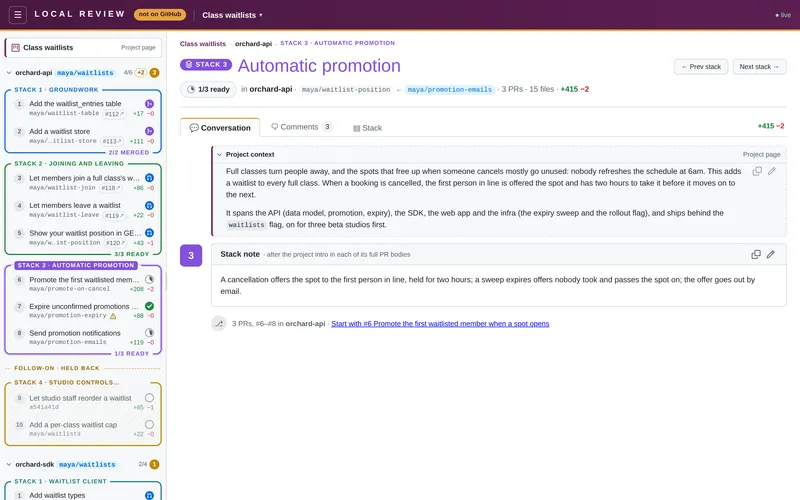
Section titled “The stack page”/<project>/<repo>/stacks/<n>-<title> (click a stack’s title in the sidebar, its name in a PR’s stepper, or its
breadcrumb) is one stack, laid out like a PR page:
- The header: a
STACK nlabel in the stack’s colour and its title in the same colour; ← Prev stack and Next stack → buttons, which go on into the next repo’s stacks; then the readiness tally (2/4 ready, green once they all are, or a purple Merged pill once they’ve all landed), a follow-on badge if it’s one, the repo, what the stack sits on and its top branch (base ← top), its PRs, distinct files and +/−, and how many have merged. - Conversation: the Project context box, then the stack note as the first comment box, with Copy and Edit (the same editor, image attachment and “changed elsewhere” notice as a PR description). An empty note offers Add a stack note. Below it, Start with #n …, a link to the stack’s first PR.
- Comments: every comment thread on the stack’s PRs, with the count of open ones on the tab. See The Comments tab.
- Stack: the stack picture of just this stack, with the same Show title, Copy image, Download PNG and SVG.
Its PRs aren’t listed again: the sidebar shows them, in the stack’s box. Unstacked commits and a repo without
stacks: get a stack page too (…/stacks/unstacked, …/stacks/branch), but no note: only stacks declared in
project.yaml have one.
The Comments tab
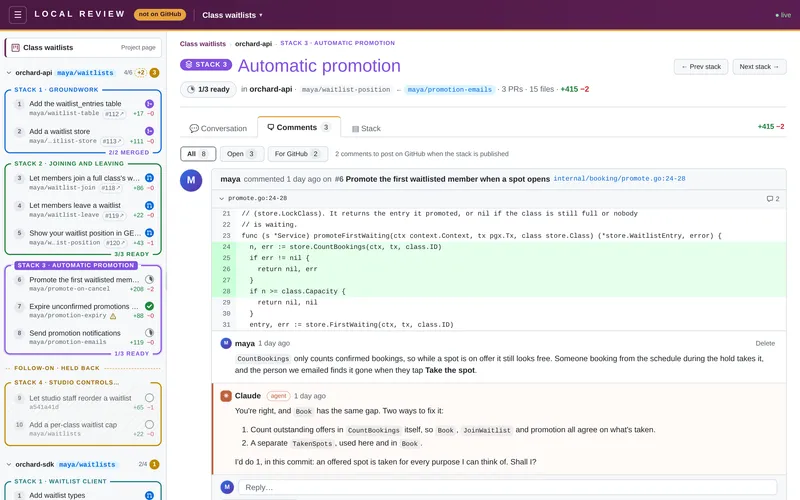
Section titled “The Comments tab”The project and stack pages’ Comments tab gathers the threads of many PRs in one list: general comments from each PR’s Conversation tab, and inline and file comments with their replies. Every commit in the sidebar counts, so PRs that haven’t been published yet are in it too. (The project intro and the stack notes aren’t threads: they stay on the Conversation tab.)
- The order: open threads first, then by last update (the newest comment or reply, or an edit), newest first. A thread you resolve or reply to here stays where it is until you leave the tab, so it doesn’t jump away from under the cursor.
- Each thread looks as it does in Files changed: who started it, when, and which PR it’s on (
#5 Show your waitlist position…, which opens that PR). An inline comment also has itsfile:line, which opens Files changed scrolled to the thread, and the lines it’s on. On the project page, each thread also shows its repo and stack, and the stack’s name opens that stack’s Comments tab. - Folding: resolved and outdated threads start folded to one row, as in Files changed. The row shows Resolved / Outdated / For GitHub, the line, who started the thread and how it begins. Click it to open the thread.
- Reply, resolve, edit and delete work as they do on the PR. They write the same review file, and so does the For the GitHub PR box on each thread.
- All / Open / For GitHub: buttons above the list, each with its count, show every thread, only the open ones, or only those marked for the GitHub PR. While some of those aren’t posted yet, a note beside the buttons says how many (on For GitHub itself, its tooltip does).
It’s live: a reply an agent writes into a review file, or a thread resolved on a PR page, shows up here (and in the counter) without a reload. A review file that isn’t valid YAML is named in a warning above the list, and its threads are left out until it’s fixed.
| URL | |
|---|---|
/ | The root page: every project. |
/<project> | The project page. |
/<project>/<repo> | The repo’s first commit. |
/<project>/<repo>/<sha> | A PR (a short or full sha). |
/<project>/<repo>/stacks/<ref> | A stack page. <ref> is the stack’s number in stacks: and its title as a slug (2-joining-and-leaving), or unstacked / branch for the implicit groups. |
…?tab=files / …?tab=stack | A PR’s Files changed or Stack tab. Add &file=<path> to jump to a file, and &thread=<id> as well to jump to a thread in it and open it. On the Conversation tab, ?thread=<id> jumps to a general thread. |
…?tab=comments / …?tab=stack | The project or stack page’s Comments or Stack tab. |
Old /<repo>/<sha> URLs (from before projects) redirect into the project that has that repo.
A stack page’s URL keeps working when stacks: is edited. The number finds the stack, and the title notices a change:
if the list was reordered, the link follows the title to its new number; if the stack was renamed, it stays on the
number. Either way the address is updated to the stack’s ref now. A bare number (…/stacks/2) works too.
Moving between PRs
Section titled “Moving between PRs”A PR you’ve already opened, the ones either side of it, and a sidebar row you rest the pointer on are loaded in the background, so they open at once. Anything else keeps the PR you were on in view, with a thin amber bar along the top of the window, until the next one is ready: never a blank page. A new PR opens at the top, unless the link points at a file in it. The same goes from a project or stack page: it stays up until the PR is ready, and the PR its Start with link points at is loaded as soon as you arrive. Project and stack pages themselves open at once. What’s kept in the browser is refreshed when the files or branches change, so it’s never out of date.
Live updates and dark mode
Section titled “Live updates and dark mode”Everything updates live: branches are polled every 2 seconds and the data files are watched, so a new commit, a new
branch, an agent’s reply or an edit to project.yaml shows up without a reload. The header’s ● live says the
page is connected; ○ offline means it lost the server and is retrying. Dark mode follows your OS setting.